Don’t Forget the Zero: Ansible Permissions and the Sticky Bit
Apr 8, 2026
When working with Ansible (not sure if this applies to other configuration management tool), especially when dealing with file copy and/or permission configuration, we can provide the mode
- name: Copy file copy: src: somefile.key dest: "/somedest/somefile.key" mode: 600That mode: 600 can be a bit deceiving, as we might intend the copied file to have rw------- permission but instead we will end up with something completely different.
Why?
In Linux, file permissions use an octal (base-8) system. Each digit represents a specific set of permissions for three distinct entities: the Owner, the Group, and Others. When you set permissions to 600, the system translates these octal digits into their binary (base-2) equivalents 110 000 000 to determine which “bits” are active rwx(owner) rwx(group) rwx(other), which in this case will result to setting the rw part of the owner bits to active.
Now unfortunately in Ansible, the number 600 in mode: 600 is interpreted as integer. Which when we convert it into its octal equivalent would be 1130 or in binary format
1 001 011 000Let’s try actually applying that permission to a file:
/tmp ❯ chmod 01130 asdf
/tmp ❯ ls -lah asdfPermissions Size User Date Modified Name.--x-wx--T 0 nov 8 Apr 08:51 asdfWe got --x-wx--T here. The --x -wx -- part we can easily deduce coming from digit 2 to 8 in the binary digit 1 001 011 000. But what about the last T here?
Turns out we need to refer to the chmod documentation:
❯ man 2 chmod...DESCRIPTION The chmod() and fchmod() system calls change a file's mode bits. (The file mode consists of the file permission bits plus the set-user-ID, set-group-ID, and sticky bits.) These system calls differ only in how the file is specified:
• chmod() changes the mode of the file specified whose pathname is given in path, which is dereferenced if it is a symbolic link.
• fchmod() changes the mode of the file referred to by the open file descriptor fd.
The new file mode is specified in mode, which is a bit mask created by ORing together zero or more of the fol‐ lowing:
S_ISUID (04000) set-user-ID (set process effective user ID on execve(2))
S_ISGID (02000) set-group-ID (set process effective group ID on execve(2); mandatory locking, as described in fcntl(2); take a new file's group from parent directory, as described in chown(2) and mkdir(2))
S_ISVTX (01000) sticky bit (restricted deletion flag, as described in unlink(2))...As you can see on the snippet above, it is mentioned that “The file mode consists of the file permission bits plus the set-user-ID, set-group-ID, and sticky bits”. So the 1 in our 1130 mode previously corresponds to this sticky bit portion of file permission.
I am aware of set-user-ID and set-group-ID which as the name implies will set some process’ effective user/group ID, effectively one can run a particular process as someone else if this bit is set (in CTF competition we often need to utilize this to do privilege escalation). But as for sticky bit, either I totally forgot or just simply didn’t know.
❯ man chmodRESTRICTED DELETION FLAG OR STICKY BIT The restricted deletion flag or sticky bit is a single bit, whose interpretation depends on the file type. For directories, it prevents unprivileged users from removing or renaming a file in the directory unless they own the file or the directory; this is called the restricted deletion flag for the directory, and is commonly found on world-writable directories like /tmp. For regular files on some older systems, the bit saves the program's text image on the swap device so it will load more quickly when run; this is called the sticky bit.So what they’re saying is that unless this sticky bit is set, we can delete file from whoever?
❯ ls -lah / | grep tmpdrwxrwxrwt - root 8 Apr 09:30 tmpIndeed the /tmp directory has that sticky bit set and when I tried to delete file owned by other user it won’t allow me.

Then to test this behavior, I created a new directory under /opt and make sure no sticky bit is set.
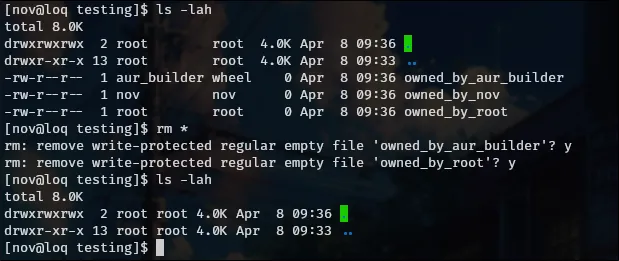
Interesting that we can do that. Today I learned.